Renew Membership

It's quick and easy to renew your membership with ICRI.

If you are logged in, click here to get started.

  1. The screen will show the renewal options available for you.
  2. Select the appropriate membership category and begin the renewal process!

Or, renew by logging in to Member Central:

  1. If you have not created your account yet, log in here first.
  2. If you have created your account, click here to log in (use the “Don’t remember your password” link if needed)
  3. Click the Join/Renew button on the main screen upon logging in.
  4. Select the appropriate membership category and begin the renewal process!
 
If you have issues renewing, please contact [email protected] for further assistance.

Lapsed members can reactivate using the same process as above – the language in the Member Central portal may say “Join” on the application but the system will continue your membership from the previous record and not create a new membership.

ICRI Membership Renewal/Invoicing Process

ICRI members are eligible to renew online using the steps above 90 days prior to expiration. Member renewal notices (invoices) are sent out 30 days in advance by email only

NOTE: If an invoice is created, you will not be able to renew directly in the Member Central portal. Please see the video guides for details on how to renew with an existing renewal notice.

Members may also receive email check ins about their membership renewal sent via PropFuel, a tool designed to create engaging, two-way conversations at points in the renewal process. These messages will come from [email protected]. Your feedback and responses are greatly appreciated!

An additional email reminder to renew will be sent 30 days into the 60-day grace period after expiration. Members who do not renew will be dropped for non-payment and receive an email notice of deactivation, but can reactivate their membership at any time.

Any questions about the renewal process can be directed to [email protected].

Setting Up Auto Renewal

Both individual and organizational members can set up auto renewal for their membership. Auto renewal members will not receive invoices, but will instead have their membership automatically processed each year. They will receive a notice by email of the charge 30-45 days before processing.

All autorenewal orders paid by credit card will incur a non-refundable 3% processing fee. This fee will be calculated based on the amount of your autorenewal order and added to your total.

Autorenewal payments made by ACH debit/electronic check will not incur additional service fees.

To set up auto renewal, log in to your account at membercentral.icri.org.

Individual Members:
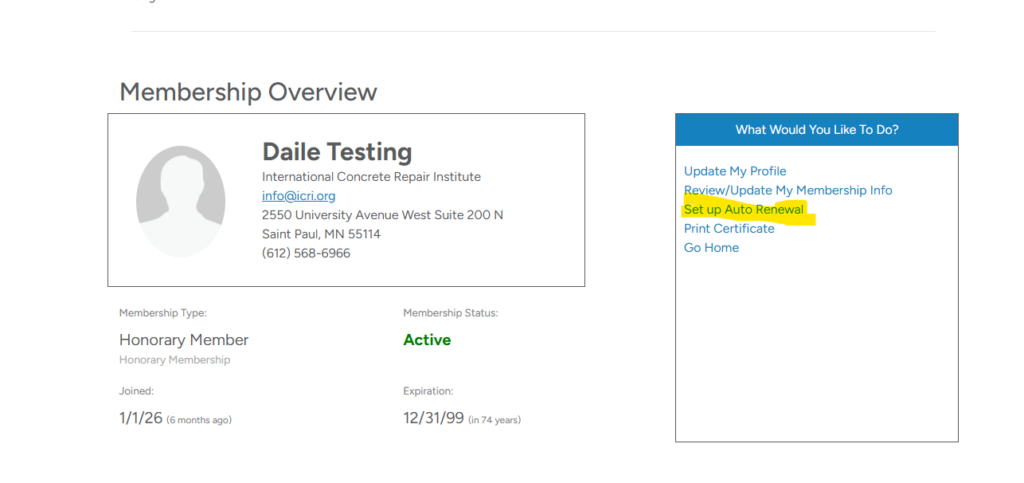


Select Set up Auto Renewal from the Membership Overview Menu.
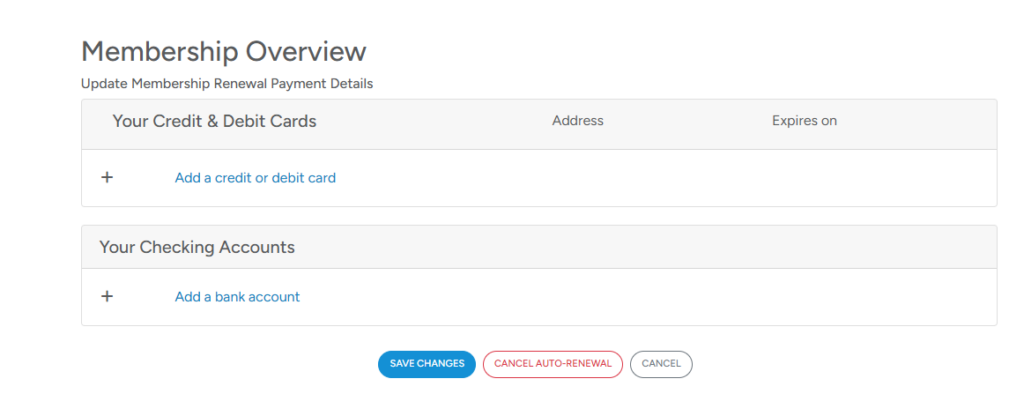

On the next screen, select to add either a credit/debit card or a checking account.
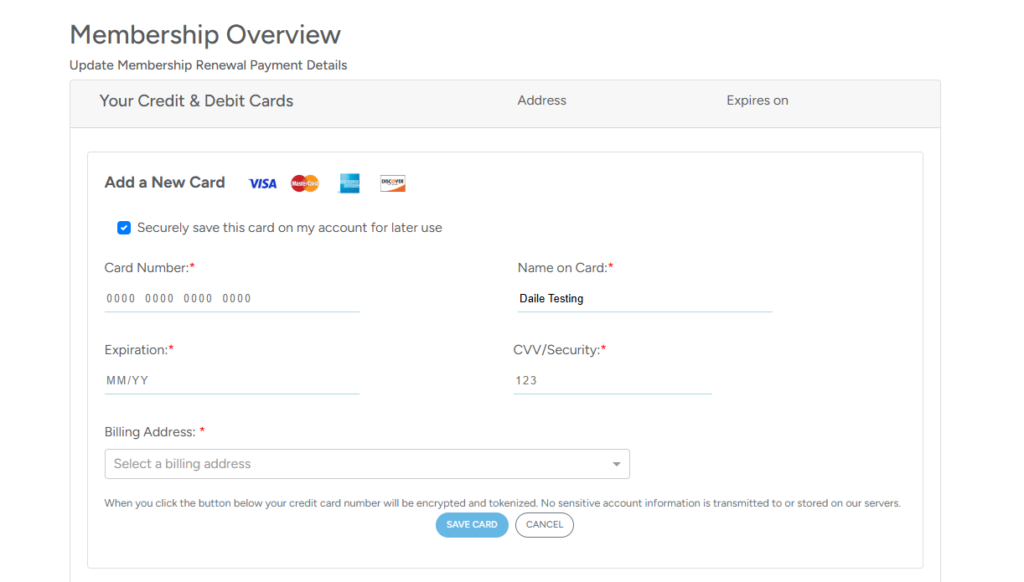


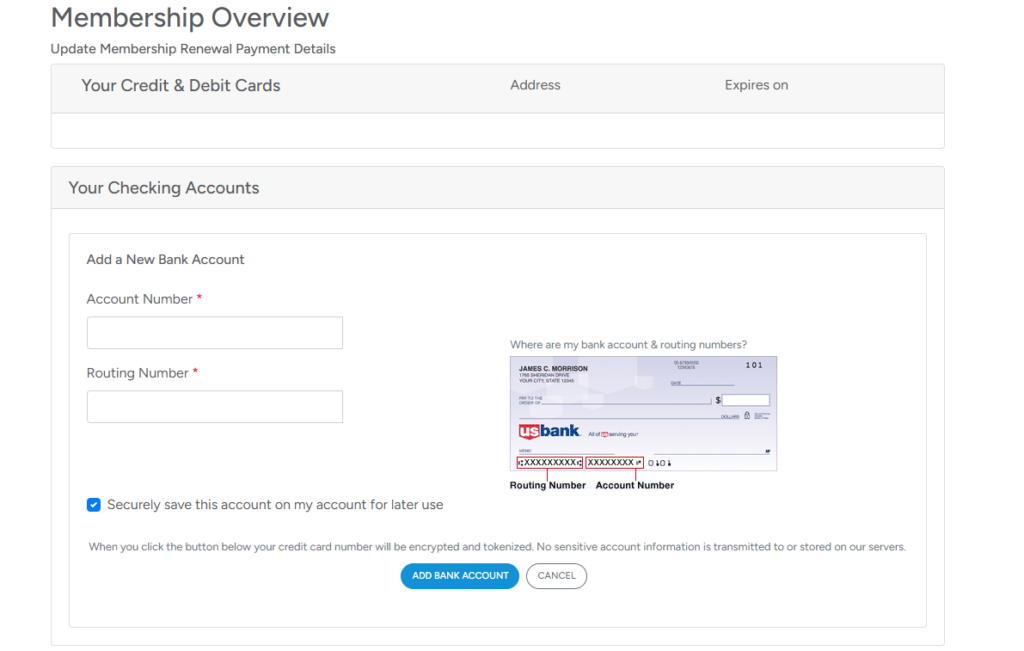
For both credit/debit and checking account payments, please be sure that you check the box to securely save the info to your account.

Once you are done, scroll to the bottom of the page and select Save Changes.

Organizational Members: The steps to set up the auto renewal are the same for your membership, but the only person who can set it up is the person with the role of Company Representative Admin or Supporting Representative Admin.

Please note that if auto renewal is set when there is an invoice is active in the system, a payment MUST be made on that open invoice and the auto renewal will take effect for the next renewal cycle.

For each video below, you can toggle playback speed, captions and other settings.

ICRI - Individual Member Renewal Process (No Invoice in System)

ICRI: Individual Member Renewal Process (Existing Invoice in System)​

ICRI - Organizational Member Renewal Process (Company/Supporting; No Invoice in System)

ICRI - Organizational Member Renewal Process (Company/Supporting; Existing Invoice in System)

Haven't created your member portal account yet?

ICRI’s member portal and website was upgraded in January 2024. If you have not visited ICRI’s website or accessed your member account in the past 2 years, you may need to create a new login. Your past login credentials will NOT work. Please click the Login button at the top of the page or visit https://www.icri.org/member-login/ to start the process. If you have already created a new account, please login at https://membercentral.icri.org.

Creating an account will not only allow you to join or renew your membership, but you can also register for ICRI events and educational opportunities. 

Ask D(ai)le!